
Change favicon icon
The favicon is the small icon displayed in the browser tab and bookmarks. You can change the favicon in your Drupal theme using either of the following methods.
Two methods to change favicon icon
- Replace theme default favicon
- From Drupal Appearance Settings
Method #1 – Replace theme default favicon
Replace favicon.ico image present in the theme folder with your own favicon image. Make sure, the name of file is favicon.ico
Clear Drupal cache
And clear Drupal cache after replacing the favicon image.
Configuration Development Performance
example.com/admin/config/development/performance
Method #2 – Set Favicon from Drupal Appearance Settings (Recommended)
This method allows you to manage the favicon from the Drupal admin UI.
Navigate to: Administration Appearance Appearance settings
example.com/admin/appearance/settings/mili
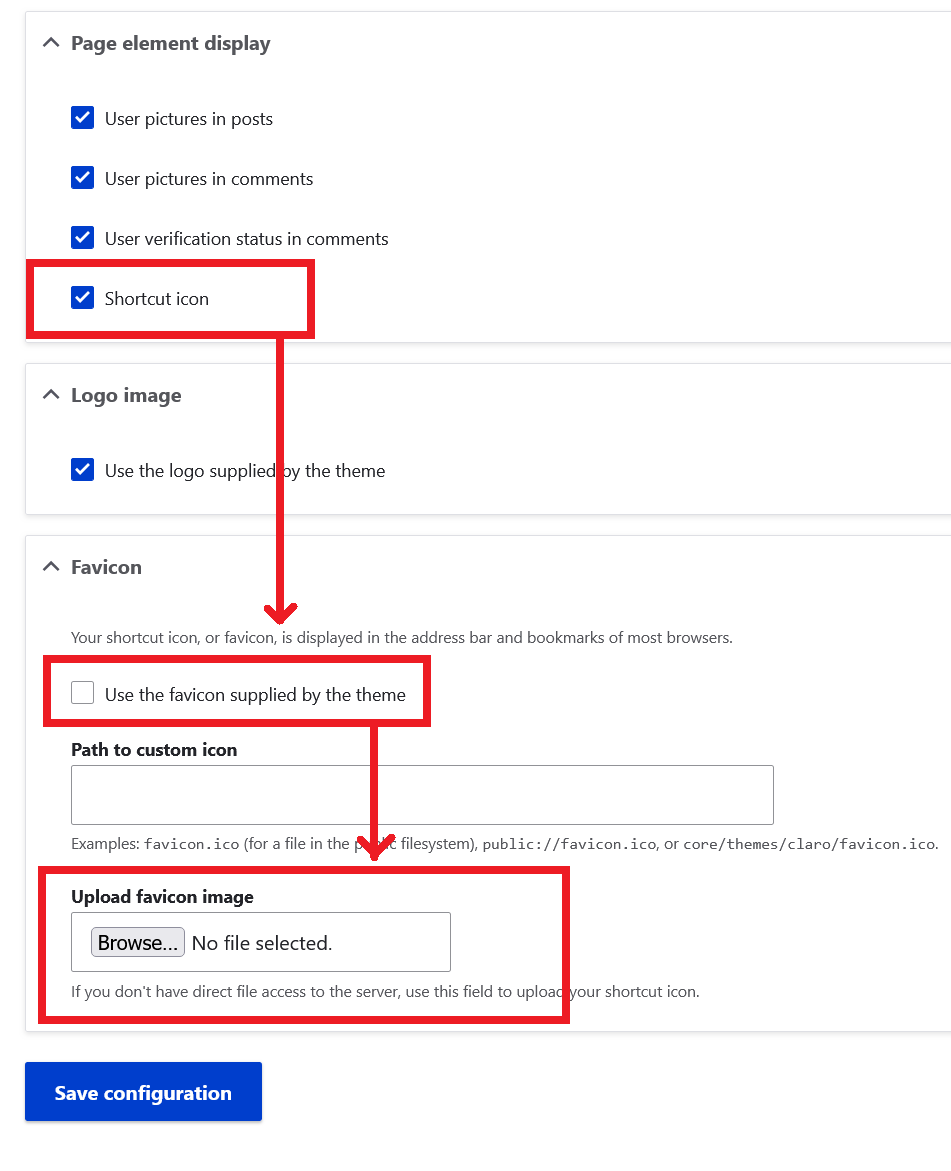
- Make sure Shortcut icon option is checked in Page element display section.
- Uncheck the option Use the favicon supplied by the theme.
- Upload your custom favicon file or provide its path.
- Click Save configuration button.
Clear Drupal cache
Clear Drupal cache after replacing the favicon image.
Configuration Development Performance
example.com/admin/config/development/performance
How to create custom favicon icon
There are many free tools / websites to create custom favicon icons and convert your image into a favicon icon, like: https://www.favicon-generator.org / https://favicon.io